User reference / Read the reports
Votes & selected plan
Inspect the individual votes and understand how one final proposal becomes the selected plan.
Recorded: executor 0.1.5 · analyst 0.1.3 · report 0.1.16
Captured 2026-09-21 · Capture provenanceExplore this view ↗
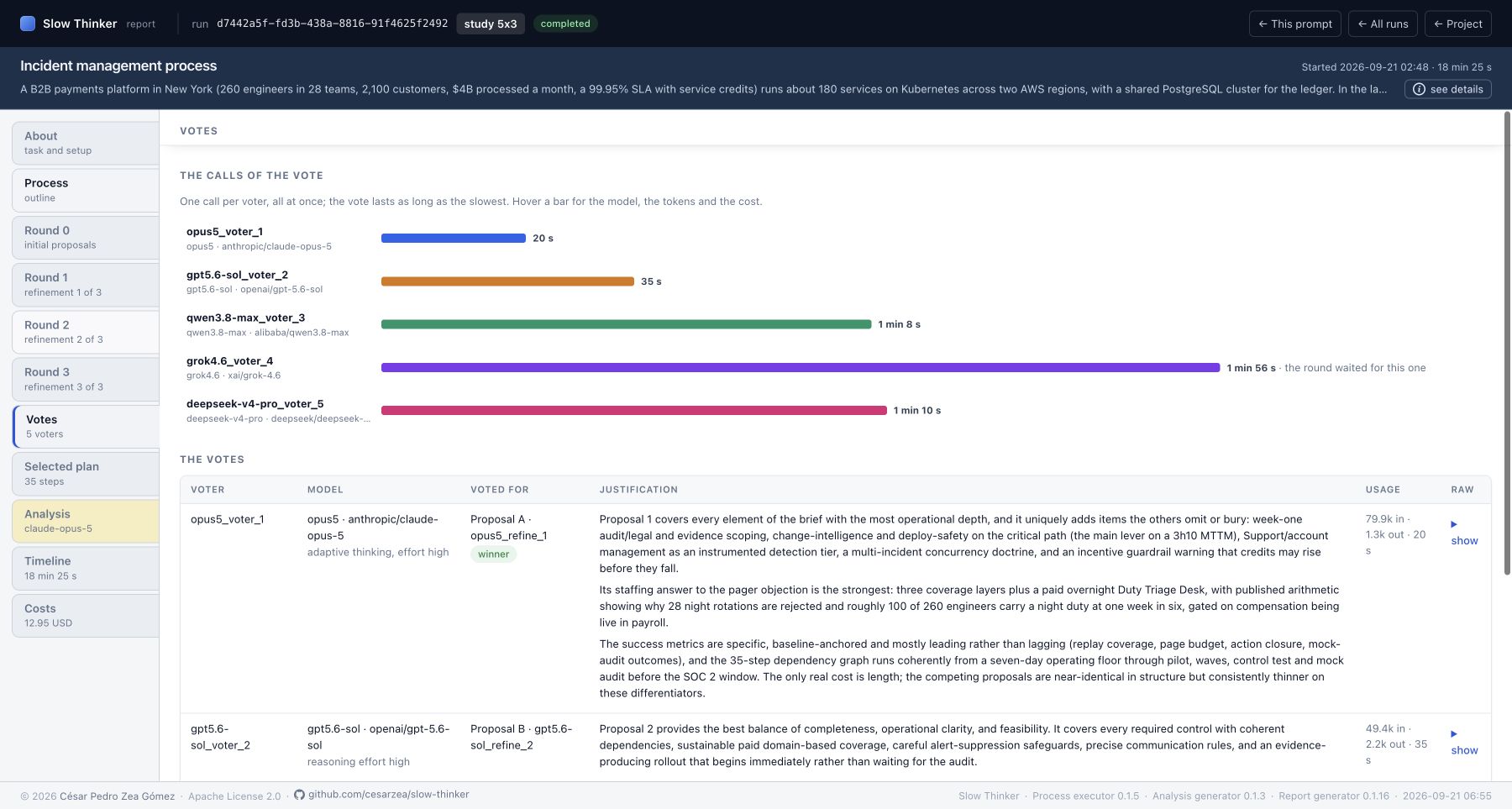
Voters receive the task and the last round's proposals, without explicit author/model labels in the proposal descriptions. The report restores those identities for inspection. Voting is a fresh call, and only valid votes are saved.
| Element | Meaning |
|---|---|
| Call-duration barsReviewed E 0.1.5 · R 0.1.16 | One per saved voter, relative to the longest recorded voter call. Popovers show model/settings, token usage and priced cost. |
| VoterReviewed E 0.1.5 · R 0.1.16 | Saved voting-agent identifier; slot assignment comes from the same llm_configs list as proposers. |
| Model / settingsReviewed E 0.1.5 · R 0.1.16 | Provider/model and effective reasoning/sampling settings of that voter. |
| Voted forReviewed E 0.1.5 · R 0.1.16 | Display letter and agent of the chosen final proposal. The winner badge marks a vote for the proposal eventually selected. |
| JustificationReviewed E 0.1.5 · R 0.1.16 | The explanation written by the voter, not a later reconstruction by the analyst. |
| UsageReviewed E 0.1.5 · R 0.1.16 | Recorded input/output tokens and duration for that call. |
| Raw / ShowReviewed E 0.1.5 · R 0.1.16 | Expand the saved voting prompt and response to inspect the alternatives and exact returned choice. |
| No valid votesReviewed E 0.1.5 · R 0.1.16 | No saved valid voting records. The executor can still select a fallback plan. |
Letters A, B… are the report's display labels; actual vote records select a proposal UUID. The voting prompt numbers proposals in supplied order. The analyst's P1, P2… convention uses agent slot numbers, so read the legend rather than assuming labels from different views are interchangeable.
The executor counts one vote per saved valid voter. It selects the proposal with the largest count. There is no confidence weighting, quorum rule, elimination round or final synthesis call.
A tie is resolved by the first tied proposal encountered while counting votes. The gathered results are processed in voter-slot order, not response-completion order. If no valid votes remain, the first final proposal is the fallback. An unresolved winning ID also falls back to the first final proposal. These rules matter when assessing a fragile majority or a run with failures.
| Element | Meaning |
|---|---|
| Winner label and agentReviewed E 0.1.5 · R 0.1.16 | The final proposal selected by the executor. |
| Votes received / total votesReviewed E 0.1.5 · R 0.1.16 | Count for the selected proposal against valid saved votes, not all configured voter slots. |
| StepsReviewed E 0.1.5 · R 0.1.16 | Number of steps copied into the selected plan. |
| Estimated complexityReviewed E 0.1.5 · R 0.1.16 | Taken from the original winning proposal, when that record is available. |
| Round and original-proposal linkReviewed E 0.1.5 · R 0.1.16 | The winning card, including its reasoning context, analyst comments and raw exchange. |
| Origin-tracing explanationReviewed E 0.1.5 · R 0.1.16 | Selected steps are traced through rounds to their introducing agents by title. The last author may not be the largest contributor. |
| Graph / Steps / Success metricsReviewed E 0.1.5 · R 0.1.16 | Same controls as the proposal panes, with traced origin labels. Metrics come from the winning proposal. |
| Metrics unavailableReviewed E 0.1.5 · R 0.1.16 | The plan record itself stores steps and selection metadata; if the winning proposal is missing, its success metrics cannot be recovered from that record alone. |
| No plan selectedReviewed E 0.1.5 · R 0.1.16 | No saved plan; the task's evaluation/error summary provides context when available. |
The selected plan is a recorded outcome of this voting procedure. Assess it alongside the analyst's blind ranking, the original alternatives and any independent evaluation you have defined.
Source files used for this reference
Reviewed at 7361ea0b71a5.